
Home theatre screens are primarily categorised by mounting style and screen material, and both factors directly determine image quality in your space. The four main projector screen options are fixed frame, motorized retractable, ambient light rejecting (ALR), and ultra short throw (UST) specific screens. Each type suits a different room condition, projector setup, and lifestyle. Choosing the wrong category is the single most common mistake homeowners make, and it costs image quality before you even turn the lights off. This guide covers every major screen type, explains what each does well, and helps you match the right option to your room.
1. Fixed frame screens: the gold standard for image quality
Fixed frame screens deliver the best image flatness of any home theatre screen type. A rigid aluminium or steel frame holds the screen material permanently taut against the wall, eliminating any wrinkles or waves that distort the projected image. Fixed frame screens keep the surface perfectly flat and wrinkle-free, which is why dedicated home cinema rooms almost always use them.
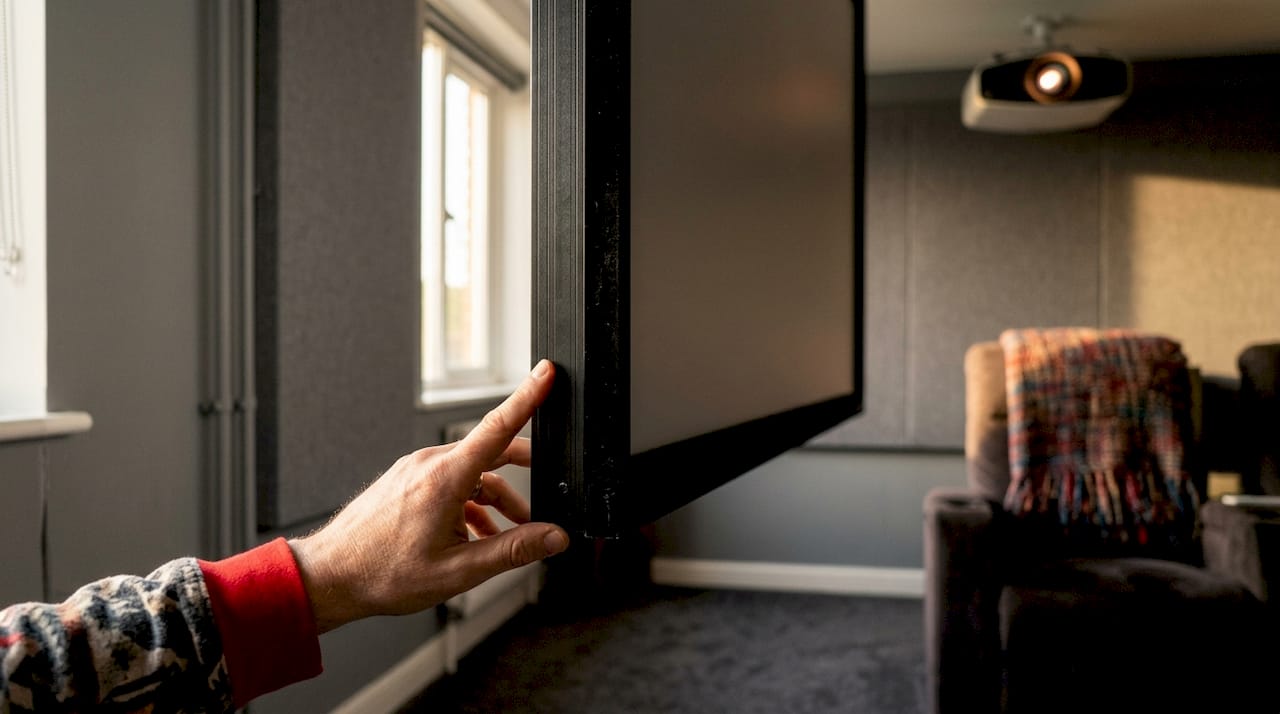
The trade-off is permanence. Once mounted, the screen stays on the wall. That works perfectly in a dedicated dark room but feels intrusive in a living room or multi-purpose space.
Key advantages:
- Perfectly flat surface for maximum image sharpness
- No mechanical parts to fail or maintain
- Compatible with ultra short throw (UST) projectors when paired with the correct optical surface
- Available in a wide range of gain values to suit different projector brightness levels
- Long lifespan with minimal upkeep
Key limitations:
- Permanently occupies wall space
- Requires a dedicated, light-controlled room for best results
- Professional installation is strongly recommended for level, secure mounting
Pro Tip: Screen flatness is not cosmetic. Even a slight bow or wave in the material creates visible distortion across the projected image, especially on high-resolution 4K content. Fixed frame is the only mounting style that eliminates this risk entirely.
2. Motorized and retractable screens for versatile spaces
Motorized retractable screens solve the biggest problem with fixed frames: they disappear when you are not watching. An electric motor rolls the screen up into a ceiling or wall-mounted housing, leaving the room looking completely normal. This makes them the top choice for living rooms, open-plan spaces, and multi-purpose rooms.
Tab-tensioned motorized screens use side tensioning to keep the material flat during operation, combining the convenience of retractable design with image quality close to a fixed frame. Without tab tensioning, rolling screens can develop waves and wrinkles over time, which noticeably degrades picture quality.
Types and features to know:
- Electric motorized screens: Drop down at the press of a button or via smart home integration. Look for motors rated under 40dB for quiet operation.
- Tab-tensioned motorized screens: Side cables keep the material taut. These are worth the extra cost for any serious home theatre setup.
- Manual pull-down screens: The most affordable retractable option. You pull the screen down by hand and lock it in place. Image flatness is the weakest of all retractable types.
Installation requirements:
- Electrical access at the mounting point for motorized models
- Structural support in the ceiling or wall for the housing unit
- Adequate drop clearance so the screen does not block windows or doorways
Pro Tip: Always choose a tab-tensioned model if you are using a motorized screen in a home theatre context. Motor noise under 40dB is the benchmark for a quiet viewing experience. Anything louder becomes distracting during quiet scenes.
3. Ambient light rejecting (ALR) screens for bright rooms
ALR screens are the correct choice for any room where you cannot fully control the light. Standard matte white screens reflect all light equally, including light from windows, lamps, and overhead fixtures. ALR screens use a micro-layered optical surface that reflects projector light toward viewers while rejecting ambient light from the sides and above.
ALR screens maintain contrast and deep blacks in rooms with significant ambient light, where a standard screen would produce a washed-out, low-contrast image. This makes them the right choice for living rooms, sunrooms, or any space with windows that cannot be fully blacked out.
Matte white vs ALR: a direct comparison
| Feature | Matte white screen | ALR screen |
|---|---|---|
| Typical screen gain | ~1.1 | 0.6–1.3 depending on design |
| Ambient light handling | Poor | Excellent |
| Contrast in bright rooms | Low | High |
| Viewing angle | Wide | Narrower (varies by design) |
| Best room type | Dedicated dark room | Living room, bright space |
| Cost | Lower | Higher |
ALR screens come in two main variants. Standard ALR screens work with long-throw and short-throw projectors. UST ALR screens are engineered specifically for ultra short throw projectors, which project from a very steep angle. Using the wrong ALR variant with your projector produces uneven brightness across the image.
Pro Tip: If your room has overhead pot lights or large windows, a standard matte white screen will underperform even with a high-brightness projector. An ALR screen is not a luxury in that situation. It is a necessity.
4. UST-specific screens and acoustically transparent options
Ultra short throw projectors sit just centimetres from the screen and project at a steep upward angle. Standard screens cannot handle this angle and produce hotspotting, where the bottom of the image appears much brighter than the top. UST ALR screens are engineered with a specialised optical surface that reflects this steep-angle light evenly toward the viewer.
Pairing a UST projector with a standard matte white or generic ALR screen is one of the most expensive mistakes in home theatre setup. The projector may cost thousands of dollars, but the wrong screen makes it look worse than a budget unit.
Acoustically transparent screens add another dimension to the home cinema experience. Acoustically transparent screens allow speakers to be placed directly behind the screen, so dialogue and sound effects appear to come from the exact position of the on-screen action. This is how commercial cinemas are built, and it produces a level of audio immersion that front-placed speakers cannot replicate.
Best room and projector matches for UST and acoustically transparent screens:
- UST projectors in living rooms where a TV cabinet or credenza sits below the screen
- Dedicated home cinemas where a multi-channel speaker system needs centre-channel placement behind the screen
- Rooms where speaker placement in front of the screen would block sightlines or create clutter
- High-end setups combining a UST laser projector with a 120-inch or larger screen for a true cinema feel
- Spaces where the projector must sit on a low shelf or floor stand rather than ceiling-mounted
5. Portable and floor-rising screens for flexible use
Portable screens are the most flexible projector screen option. They fold or roll up for transport and set up in minutes without any wall mounting. Floor-rising models use a spring or gas mechanism to extend upward from a base unit, making them ideal for rooms where ceiling or wall mounting is not possible.
Image quality on portable screens is the weakest of all categories. The material is thinner, the frame is lighter, and flatness is inconsistent. Portable screens suit casual movie nights, presentations, or temporary setups. They are not the right choice for a permanent home theatre.
The gain on most portable screens sits around 1.0 to 1.2, which works adequately in a darkened room. Outdoors or in bright spaces, the image washes out quickly without an ALR surface, and most portable screens do not offer ALR material.
6. How to match screen types to your room and projector
Selecting a screen without considering ambient light is the most common error homeowners make. A matte white screen in a bright room makes even a high-quality projector look poor. The decision process starts with your room, not your projector.
Use this checklist to choose your screen type:
- Assess your room lighting. Can you fully darken the room? If yes, a fixed frame or standard motorized screen works well. If no, you need an ALR screen.
- Identify your projector type. Do you have a UST projector? If yes, you must use a UST-specific ALR screen. Standard screens will cause hotspotting.
- Consider room usage. Is the room a dedicated theatre or a multi-purpose living space? Dedicated rooms suit fixed frame screens. Multi-purpose rooms suit motorized retractable screens.
- Set your budget. Fixed frame screens offer the best value for image quality. Motorized tab-tensioned screens cost more. ALR and UST screens carry a premium for their optical engineering.
- Plan for audio. If you want speakers behind the screen for accurate sound localisation, choose an acoustically transparent screen from the start. Retrofitting this later is difficult.
- Think about future upgrades. If you plan to upgrade to a UST projector later, choose a UST-compatible ALR screen now rather than replacing the screen twice.
Installation complexity also varies by type. Fixed frame screens require precise levelling and secure wall anchoring. Motorized screens need electrical access and structural support. Both benefit significantly from professional installation to avoid alignment errors that affect image quality.
Key takeaways
The right home theatre screen type depends on your room’s ambient light, your projector’s throw distance, and how you use the space.
| Point | Details |
|---|---|
| Fixed frame for image quality | Rigid frames keep material perfectly flat, making them the best choice for dedicated dark rooms. |
| Motorized screens for multi-use rooms | Tab-tensioned motorized screens hide when not in use and maintain good flatness during operation. |
| ALR screens for bright spaces | ALR technology rejects ambient light, preserving contrast and black levels in rooms with windows or overhead lighting. |
| UST screens are non-negotiable | Ultra short throw projectors require UST-specific ALR screens to avoid hotspotting and image distortion. |
| Acoustically transparent screens add immersion | Placing speakers behind the screen aligns audio with on-screen action for a true cinematic experience. |
My take on choosing the right screen after years of installations
Fixed frame screens are unbeatable for pure image quality, but they only make sense in a room you are willing to commit to as a theatre. I have seen homeowners install a beautiful fixed frame screen in their living room and regret it within a month because the screen dominates the space even when the projector is off.
Motorized screens impress me most in multi-use homes. The tab-tensioned models have closed the image quality gap with fixed frames considerably. The planning required for motor housing and electrical access is real, but it pays off every time you watch a film in a room that looks completely normal an hour later.
ALR screens have become a near-must-have for Canadian homes. Most living rooms have large windows and pot lights that cannot be fully controlled. An ALR screen is not an upgrade in those spaces. It is the baseline requirement for a watchable image.
The UST pairing issue is the one I see cause the most frustration. Homeowners spend serious money on a UST laser projector and then pair it with a standard screen because they did not know the difference. The result looks worse than a much cheaper setup. Match your screen to your projector type before you buy either one.
Acoustically transparent screens are worth serious consideration if you are building a dedicated cinema room. The difference in audio immersion when the centre channel sits directly behind the screen is not subtle. It is the detail that makes a home cinema feel genuinely cinematic rather than just a big TV.
— Pixlcanada
Professional screen installation across Canada
Getting the screen right on paper is only half the work. Proper mounting, levelling, and alignment determine whether your investment actually performs as intended.
Pixlcanada provides professional installation services for fixed frame screens, motorized retractable setups, and full home theatre configurations across Canada. Our technicians serve homeowners in Toronto, Hamilton, Calgary, Vancouver, Edmonton, and beyond. Every installation is handled with care for both image performance and room aesthetics, backed by a track record of five-star reviews from clients across the country. If you want your screen mounted correctly the first time, our team is ready to help.
FAQ
What are the main types of home theatre screens?
Home theatre screens are categorised by mounting style and material into fixed frame, motorized retractable, manual pull-down, portable, ALR, and acoustically transparent types. Each suits a different room condition and projector setup.
Do I need an ALR screen for my living room?
Any room with windows, overhead lighting, or ambient light that cannot be fully controlled benefits from an ALR screen. A standard matte white screen in a bright room produces a washed-out image regardless of projector quality.
Can I use any screen with a UST projector?
No. UST projectors require specifically engineered UST ALR screens. Using a standard screen with a UST projector causes hotspotting and image distortion due to the steep projection angle.
What is a tab-tensioned motorized screen?
A tab-tensioned motorized screen uses side cables to keep the screen material flat as it rolls down. This prevents the waves and wrinkles that standard rolling screens develop over time, significantly improving image quality.
Are acoustically transparent screens worth the cost?
Acoustically transparent screens are worth the investment for dedicated home cinema rooms. Placing speakers behind the screen aligns dialogue and sound effects with on-screen action, producing a level of audio immersion that front-placed speakers cannot match.