
A smart home has devices such as a thermostat, doorbell, lock, bulbs or plugs that connect through WiFi or a hub and that you control from a phone, a schedule or your voice. Start with one useful job, such as the front door or the heating. Pixl’s posted installs: doorbell $99, thermostat $129, WiFi from $129.
PCBy the Pixl Canada install team. Checked November 1, 2026. 7 min read.
- Three layers, explained plainly
- A priority table of upgrades
- Starter sets priced from posted Pixl installs
- Privacy basics from Government of Canada advice
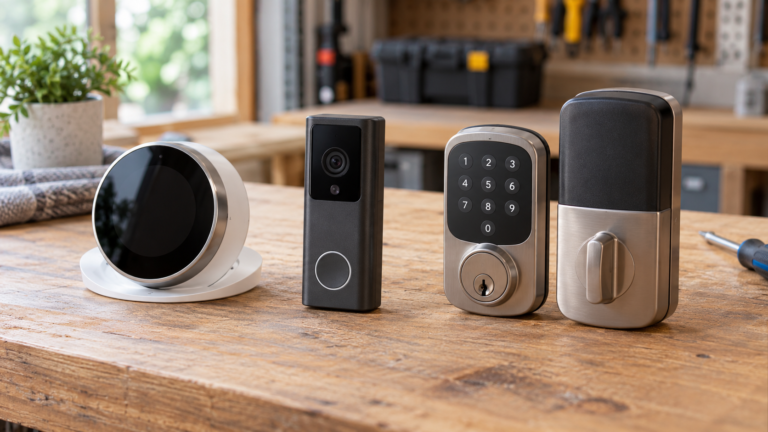
- Start with one useful job. The front door and the heating are the usual first choices.
- Fix WiFi first if it is patchy. Every device depends on it.
- You do not need a hub to begin, and Matter makes the ecosystem choice less final.
- Change default passwords, turn on updates and use a separate network.
What is a smart home?
A smart home has three layers. The network carries the signals, the devices do the work and one or more apps tell them what to do. Every smart device does one of three jobs: it senses something (a doorbell press, a temperature), it decides (a schedule or a rule) or it acts (a lock turns, a heater starts). A home becomes smart when you can control those jobs from a phone, and truly helpful when two of them work together.
| Layer | What it is | Where to read more |
|---|---|---|
| Network | Your router and WiFi, the base that every device relies on | WiFi installation service and how to improve WiFi signal |
| Devices | Thermostat, doorbell, lock, camera, plugs, bulbs, sensors | Smart home installation |
| Control | An app, a voice assistant and sometimes a hub | Do you need a smart home hub and Google Home vs Alexa vs Apple Home vs SmartThings |
Which smart home upgrades come first?
These are ranked for a typical Canadian home by how often you use them and how little they ask of you. Posted Pixl installation prices are in the last column. Device prices vary, so check the current price. Smart plugs and speakers have no posted Pixl price.
| Upgrade | What you gain | Renter-friendly? | Pixl posted install (before tax) |
|---|---|---|---|
| Video doorbell | See and speak to visitors from your phone | Often needs approval; battery models can avoid wiring | $99 battery, $149 wired on existing wiring |
| Smart thermostat | Schedules and remote control of heating and cooling | Needs approval; 24 V systems only for standard models | $129, plus $50 only if a C-wire adapter step is needed |
| WiFi or mesh network | Signal where the devices actually are | Yes, on your own internet account | From $129 |
| Smart lock | Keypad or phone entry, no hidden key | Needs approval | Quoted from a photo; no fixed price |
| Smart plugs and bulbs | Schedules and voice control for lamps and small appliances | Yes | No posted price; ask for a quote from a photo |
| WiFi camera | A view of a room or entry | Check the lease | $89 per camera added to a visit |
Not sure where your home should start?
Send a photo of your front door, thermostat and router. We reply with a fixed price for the parts Pixl installs.
Where should you start: by budget, room or situation?
| Starting point | Install total | What it covers |
|---|---|---|
| One job | $99 or $129 | A battery doorbell ($99) or a thermostat ($129) |
| Entrance and heating | $228 | Battery doorbell $99 plus thermostat $129 |
| Add the WiFi underneath | From $357 | Doorbell, thermostat and WiFi setup from $129 |
| Add a camera | From $446 | The set above plus one WiFi camera at $89 |
With a wired doorbell on existing wiring instead of a battery one, the three-job set becomes $149 + $129 + from $129 = from $407. A $50 C-wire adapter step is added only if the thermostat needs it. A lock, plugs and speakers are not in these totals. Our smart home packages and smart home installation cost pages go deeper on totals.
| If you… | Start with | Read next |
|---|---|---|
| Rent your home | Plugs, bulbs and a router you own; ask before touching door or heating | Smart home for renters |
| Own a house with a furnace or heat pump | Thermostat, then the entrance | Choosing a smart thermostat |
| Want to stop carrying keys | A smart lock that suits your door | Which smart lock fits your door |
| Have patchy WiFi | Fix the network first, then add devices | Mesh vs extender |
| Are helping an older relative | Doorbell, thermostat and WiFi, set up for them | Smart home for seniors |
Do you need a hub, and which ecosystem?
Most homes starting with a WiFi doorbell, thermostat and lock do not need a hub, because each device has its own app. A hub or Thread border router comes in when you add Zigbee, Z-Wave or Thread devices or want one app for everything. Pick the app your household already has phones for, and look for the Matter logo so a device can work in more than one app. Details are in Matter and Thread explained. You can change your mind later.
What are the privacy and security basics?
Every connected device is another thing on your network, so treat setup as part of the install. The Government of Canada’s Get Cyber Safe site and the Canadian Centre for Cyber Security give the same core advice.
| Do this | Why |
|---|---|
| Change default usernames and passwords | Defaults are widely known; use a strong, unique password for the Wi-Fi and each device account |
| Turn on two-factor sign-in where offered | Protects the app account that controls your door or camera |
| Turn on automatic updates | Install updates when prompted if automatic updates are not available |
| Put smart devices on a separate network | A guest network keeps them away from your computers. See guest WiFi and an IoT network |
| Switch off what you do not use | Bluetooth, microphones, cameras and location when they are not needed |
| Read what data the maker collects | Check whether data is shared with advertisers or other third parties before you buy |
What does Pixl install?
Buy the devices at any store. Pixl mounts and wires them, connects them to your WiFi and sets up the app. Posted prices before tax: $99 battery video doorbell, $149 wired doorbell on existing wiring, $129 smart thermostat (+$50 only if a C-wire adapter step is needed), from $129 WiFi or mesh setup and $89 per WiFi camera. A smart lock has no fixed price: send a photo of the door. Fixed price before you book, pay after the job. See video doorbell installation, smart thermostat installation, smart lock installation and the full price list.
Smart homes: frequently asked questions
What is a smart home?
A home where connected devices can be controlled from an app, a schedule or a voice assistant, and in some cases react to each other. A thermostat that lowers the heat when you leave, or a doorbell that sends an alert to your phone, are everyday examples.
What are the best smart home devices to start with?
Start with the ones you will use daily: a video doorbell or lock for the entrance, a smart thermostat for heating and cooling, and solid WiFi underneath. Plugs and bulbs are cheap extras. Our priority table ranks them by daily use, effort and renter-friendliness.
What are the top smart home upgrades?
For most Canadian homes the short list is the thermostat, the front door (doorbell or lock) and the WiFi they rely on. Then add plugs and bulbs, then cameras and sensors where you have a reason.
Do I need a hub for a smart home?
Not to begin with. WiFi doorbells, thermostats and plugs work through their own apps. You need a hub or border router for Zigbee, Z-Wave or Thread devices, or if you want one app for everything. See our hub guide.
Which is better, Google Home, Alexa or Apple Home?
Choose by the phones your household uses first, then by the devices you want. Matter lets many devices work in more than one app, so the choice is less final than it used to be. Our ecosystem comparison goes through the details.
Is a smart home safe and private?
It can be, if you set it up with care. The Government of Canada’s Get Cyber Safe advice is to change default usernames and passwords, turn on updates, keep smart devices on a separate network and switch off features you do not use.
Can renters have a smart home?
Yes. Plugs, bulbs, sensors and speakers need no approval, while doorbells, locks and thermostats need the landlord’s yes first. See our renter guide.
Does Pixl install smart home devices?
Yes. Posted prices are $99 for a battery video doorbell, $149 for a wired one on existing wiring, $129 for a smart thermostat and from $129 for WiFi or mesh setup, with $89 per WiFi camera. A lock is quoted from a photo.
Ready to start with one device?
Send a photo and the model. You get a fixed price before you book and pay after the job.
Smart home packages
Smart home installation cost
Do you need a smart home hub
Google Home vs Alexa vs Apple Home vs SmartThings
Matter and Thread explained
Installation price list
All installation guides
Sources and method. Security advice follows the Government of Canada’s Get Cyber Safe guidance on TVs and smart devices and the Canadian Centre for Cyber Security’s guidance on Internet of Things devices, read November 1, 2026. Pixl prices are the posted prices on the installation price list. Starter-set totals add posted install prices, calculated with Python, and exclude devices, tax, a lock, plugs and speakers. Device prices vary, so check the current price. Ranking by daily use is our editorial view, not a test.
About Pixl Canada. Pixl Canada is an installation company based in Edmonton, Alberta, serving cities across Canada with TV mounting, security cameras, appliance installation and smart home setup. Call or text (587) 899-7495. Open Monday to Saturday 8am to 8pm and Sunday 9am to 7pm.