
A renter can build a useful smart home without drilling or changing anything the landlord owns: plugs, bulbs, sensors and a hub need no approval, while a video doorbell, a retrofit lock and a thermostat need the landlord’s yes first. A starter kit with no approval costs about $160 to $480. Adding a battery doorbell with Pixl’s published $99 install brings it to about $360 to $830, and a retrofit lock brings it to about $660 to $1,580. This page lists what to install and what to put in writing.
PCBy the Pixl Canada install team. Calculated October 27, 2026. 7 min read.
- Which devices need landlord approval
- Three renter kits with totals
- What to get in writing
- Move-out checklist
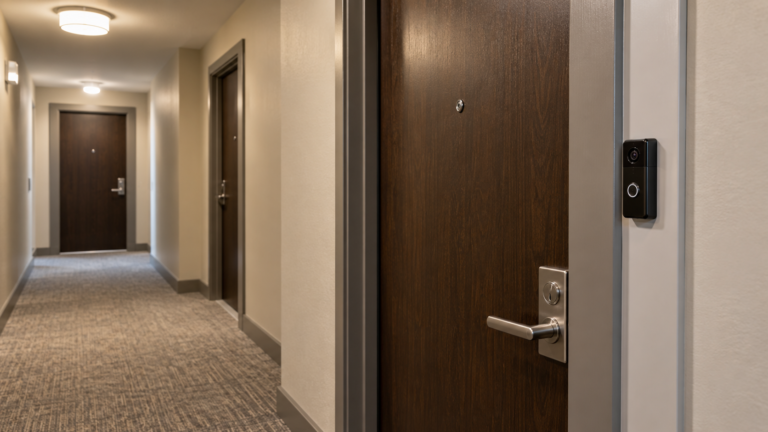
- Plugs, bulbs, sensors and speakers are plug-and-play and leave no marks.
- Anything on the door, the hallway or the heating needs the landlord’s written permission.
- A retrofit lock keeps the original cylinder, which makes approval easier than a lock swap.
- Plan the move-out before you install. Keep original parts and use removable mounts.
Which smart home devices can a renter install, and which need approval?
| Device | Landlord approval | Drilling | Takes with you |
|---|---|---|---|
| Smart plugs, bulbs, sensors, speaker or hub | No | No | Yes |
| WiFi router or mesh on your own internet account | No | No | Yes |
| Indoor camera inside your own unit | Check the lease | No | Yes |
| Battery video doorbell | Yes | Not always. Adhesive, over-the-door and clamp mounts exist for some models | Yes |
| Retrofit smart lock (over the existing thumb turn) | Yes | No, but it attaches to your door | Yes |
| Smart deadbolt that replaces the lock | Yes, in writing | Maybe | Only if the original is kept |
| Smart thermostat (24 V) | Yes | Usually no, holes may be reused | Keep the original to refit |
| Baseboard thermostat (line voltage) | Yes, plus electrical work | No | Electrician question. See baseboard thermostats |
Many provincial tenancy laws restrict changing the locks without the landlord’s consent, and Ontario’s Residential Tenancies Act is one. Check your province and your lease. We do not give legal advice. For cameras in rentals see security cameras for apartments and condos and landlord cameras in rentals. If you live in a condo unit, also read doorbell cameras in Canadian condos.
What does a renter smart home cost?
Device prices are rounded market ranges in CAD: plug $15 to $35, sensor $20 to $45, speaker or hub $60 to $250, battery doorbell $100 to $250, retrofit lock $150 to $400. Pixl’s published battery doorbell install is $99. Lock labour is a market estimate.
| Kit | What is in it | Approval | Total |
|---|---|---|---|
| A. No-approval kit | 4 plugs, 2 door or window sensors, 1 speaker or hub. You set it up in the app | None | $160 to $480 |
| B. Doorbell kit | Kit A plus a battery video doorbell, installed by Pixl at $99 | Landlord or board | $359 to $829 |
| C. Door kit | Kit B plus a retrofit smart lock with installation ($150 to $350 market labour) | Landlord, in writing | $659 to $1,579 |
See video doorbell installation and smart lock installation. The same devices in an owned home are in smart home packages by home type.
What should you get in writing from the landlord?
| Item | Why it matters |
|---|---|
| Permission for each device and location | A general yes is easy to dispute later. Name the doorbell, the lock or the thermostat |
| Mounting method | Adhesive, clamp or screws. Screws leave holes to patch |
| Landlord access to the unit | If you change a lock, the landlord still needs a way in for lawful entry. A code or a key solves this |
| Camera field of view | Do not film hallways, neighbours’ doors or shared areas beyond what is allowed |
| Restoring the original | Agree that you keep the original lock cylinder or thermostat and refit it at move-out |
| Who pays for damage or removal | Settle it before the install, not after |
What is the move-out plan?
- Keep the originals in a labelled bag: lock, thermostat, doorbell button.
- Remove each device from your account and factory reset it, so the next tenant cannot see your video or codes.
- Take the devices. Plugs, sensors and the hub travel with you. A battery doorbell can too.
- Patch any holes and remove adhesive residue.
- Photograph the door and walls before you hand back the keys.
What should you say to the landlord?
A short, specific request is approved faster than a vague one. Name the device, the place, the mounting method and the removal plan, then ask for a reply in writing. Adapt this wording to your situation.
| Device | What to write |
|---|---|
| Battery video doorbell | “I would like to fit a battery video doorbell beside my unit door using an adhesive mount, with no drilling. I will remove it and clean the spot when I move out. Please confirm in writing.” |
| Retrofit smart lock | “I would like to fit a retrofit lock on the inside of my door over the existing thumb turn. The outside cylinder and key stay as they are, and you can still enter with your key. I will remove it when I move out.” |
| Smart thermostat | “I would like to replace the thermostat with a smart model. I will keep the original and refit it when I move out. The wiring is not changed.” |
Keep the reply with your lease. If your landlord says no, the no-approval kit still gives you remote control of lights and appliances, door and window alerts, and voice control without touching the unit.
You rent a house, apartment or condo unit and want smart devices that do not damage anything or cause trouble with the landlord.
You own your home. Start with smart home packages. Or you manage rentals as a landlord, in which case read landlord cameras in rentals.
Smart home for renters: frequently asked questions
Can I install a smart lock in a rental?
Only with the landlord’s consent. Tenancy law in many provinces restricts changing locks without it. A retrofit lock that keeps the original cylinder is the easiest to get approved.
Can I put a video doorbell on my apartment door?
Ask the landlord or building first, since the door and hallway are usually not yours. A battery model avoids wiring, and some models use adhesive or over-the-door mounts.
What smart devices need no permission?
Plugs, bulbs, sensors, speakers and your own router or mesh, because they plug in and leave no marks.
Can I change the thermostat in a rental?
Ask first. Keep the original and refit it at move-out. A line-voltage baseboard thermostat is electrical work and needs an electrician and the landlord’s approval.
Can I take my smart devices when I move?
Yes. Remove each device from your account, factory reset it, and refit any original parts you removed.
Can Pixl install a doorbell in my rental?
Yes, once you have the landlord’s permission. A battery doorbell is $99 before tax, and we confirm the price from a photo before booking. You pay after the job.
Is an indoor camera allowed in a rental?
Inside your own unit it is usually your choice, but check the lease. Do not point it at shared areas or at anyone’s private space.
Got your landlord’s yes? Get it installed
Send the device model and a photo of the door. Fixed quote from photos before booking. Pay after the job.
Smart lock installation
Which smart lock fits your door
Do you need a smart home hub
New home setup package
Condo and apartment TV mounting
Smart home setup for a parent
Best smart plug in Canada
What is a smart home
Sources and method. Pixl’s battery doorbell install price ($99) is from the video doorbell service page. Lock labour is a market estimate, not a fixed Pixl price. Device prices are rounded market ranges. Kit totals were calculated with Python: Kit A low = 4 x 15 + 2 x 20 + 60 = $160, high = 4 x 35 + 2 x 45 + 250 = $480. Kit B = Kit A + $100 to $250 doorbell + $99 install = $359 to $829. Kit C = Kit B + $150 to $400 lock + $150 to $350 labour = $659 to $1,579. Tenancy law differs by province and can change, so check your province’s rules and your lease. This is not legal advice.
About Pixl Canada. Pixl Canada is an installation company based in Edmonton, Alberta, serving cities across Canada with TV mounting, security cameras, appliance installation and smart home setup. Call or text (587) 899-7495. Open Monday to Saturday 8am to 8pm and Sunday 9am to 7pm.