
To upgrade home security in Canada, work in this order: strengthen the doors, light every entrance, add a doorbell camera and one or two cameras, then secure the WiFi they run on. The Red Deer RCMP checklist calls for solid-core exterior doors, a deadbolt, strike plates and hinges fixed with 7.5 cm (3 inch) screws, and well-lit entrances.
PCBy the Pixl Canada install team. Police checklist and Cyber Centre guidance read October 31, 2026. Pixl prices checked the same day. 7 min read. CAD, before tax.
- Upgrade order, door to WiFi
- Checklist by zone from a police source
- WiFi settings to check on the router
- Pixl prices for doorbell, cameras and WiFi
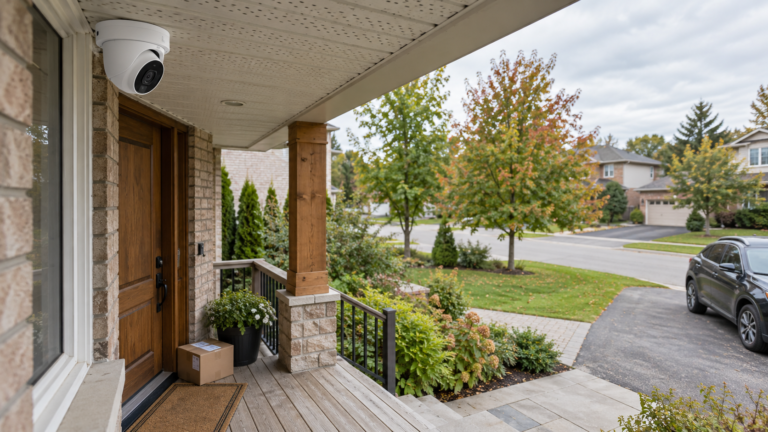
- Fix the low-cost weak points first: door, lock, strike plate and lighting. They are all on the police checklist.
- Add a doorbell and cameras next, then lock down the WiFi they depend on.
- Hard-wired lights and new outlets are an electrician’s job. Pixl installs the devices.
- Do the free checks first. Keep the paid ones for the gaps.
How do you upgrade home security, step by step?
Start with what costs least and covers the entry points on the police checklist. Each step builds on the one before it, and none needs a monitoring contract.
| Step | Upgrade | Why here | DIY or Pixl |
|---|---|---|---|
| 1 | Doors, locks and strike plates | Doors have the most items on the checklist | DIY, or a locksmith. Smart lock install by Pixl |
| 2 | Lighting at every entrance | Lit entrances are on the checklist | DIY. Hard-wired work: an electrician |
| 3 | Video doorbell | Shows who is at the door | Pixl: $99 battery, $149 wired |
| 4 | Cameras on the approach and yard | Record what happens outside | Pixl: from $200 for one or two |
| 5 | WiFi that holds the cameras and locks | Devices go offline on weak WiFi | Pixl: home WiFi or mesh setup from $129 |
| 6 | Habits and neighbours | Free, and they make the rest work | You |
The order is ours, based on cost and effort. The door and garage checks come from a police checklist, quoted below.
What should a home security checklist include?
The City of Red Deer publishes this home security checklist on its RCMP crime prevention pages. Use it as a walk-around. Your local police service may use different figures, so check theirs.
| Zone | Check these | Fix |
|---|---|---|
| Exterior | Shrubs cut below window level; tree limbs above window level; house number visible from the street and at night; entrances and garage well lit; bikes, mowers and ladders kept inside | Trim, light, store |
| Doors | Solid-core exterior doors; 2.5 cm deadbolts; door jambs securely fastened; strike plates and hinges fixed with 7.5 cm (3 inch) screws; 180 degree peepholes; locks re-keyed since you moved in | Longer screws, deadbolt, re-key |
| Windows | Windows pinned or fitted with back-up locks; basement and metal windows with back-up locks; curtains that cover the window fully | Add locks |
| Garage | Door closes tightly; overhead door has a quality lock; keys out of the vehicle; garage light switchable from inside | Lock, light |
Lock choice matters once the door is solid. See which smart lock fits your door and smart lock installation.
Add a doorbell and cameras to the checklist
Send photos of your doors and yard. Fixed price for WiFi jobs, free written quote for wired CCTV. You pay after the job.
How do lighting, a doorbell and cameras fit in?
| Upgrade | What to do | Pixl role and price |
|---|---|---|
| Entrance lighting | Make sure every entrance and the garage are lit, per the checklist | Not offered. New fixtures or wiring need an electrician |
| Video doorbell | Pick battery or wired. See wired vs battery doorbells | $99 battery, $149 wired on existing wiring. Doorbell service |
| Cameras | Cover the approach, driveway and back entrance. See where to place cameras | From $200 for one or two WiFi cameras, $89 each added to a visit. Wired CCTV: free written quote |
| Smart lock | Replace the deadbolt with a smart one if you want codes or app control | Labour is a market estimate of $150 to $350 on a standard door, not a fixed Pixl price. Lock extra. Fixed quote from photos |
Pixl can supply the cameras, or install ones you already own. For a no-monthly-fee set-up see cameras without a subscription, and for a full plan see home security systems in Canada. Compare the choices in how to choose a security camera and best home security cameras.
Which WiFi settings protect your cameras and locks?
Cameras and smart devices are only as safe as the network. The Canadian Centre for Cyber Security lists these router practices.
| Setting | What to do |
|---|---|
| Default passwords | Change the default password for the WiFi network and for the router itself. Use a passphrase or a strong, unique password |
| Encryption | Turn on WPA2 or WPA3 |
| WPS | Turn off Wi-Fi Protected Setup |
| Firmware | Keep router firmware current and turn on automatic updates if your model has them |
| Guest network | Put guests and smart devices on their own network |
| Remote administration | Turn it off if you can |
| End-of-life routers | Ask your provider if the router still receives updates |
Menu names change by router and firmware, so check the maker’s page. More: guest WiFi for cameras and smart devices, WiFi dead zones for doorbells and cameras and how to secure IP cameras. Pixl sets up home WiFi and mesh from $129: WiFi installation service.
What does a starter upgrade cost?
| Example | Sum | Total |
|---|---|---|
| Battery doorbell, home WiFi setup and one camera | $99 + $129 + $89 | $317 |
| The same with a second camera | $99 + $129 + 2 x $89 | $406 |
| Starter above plus smart lock labour (market estimate, lock extra) | $317 + $150 to $350 | $467 to $667 |
| Four or more cameras, or any recorder system | Free written quote | No number until quoted |
Planning sums only. Walls and extra parts can move them, and photos settle the final price before you commit.
How does booking work?
- Send photos. Doors, yard, router and the spots for a doorbell and cameras.
- Say what you want. Doorbell, cameras, lock, WiFi, or a mix.
- Get a price in writing. Fixed price for WiFi jobs, free written quote for wired CCTV.
- Choose a day. Same-day service is available when we have an opening.
- Pay at the end. Card, e-transfer or cash after the devices are tested.
Install the devices on your upgrade list
Fixed price from photos. You pay after the job.
You are upgrading a house, condo or rental and want the doorbell, cameras and WiFi done in one visit.
You need new outlets, hard-wired lighting or monitored alarm response. Use an electrician or an alarm provider. Pixl installs and sets up devices only.
Home security upgrades: frequently asked questions
How do I upgrade my home security?
Work from the door outward: solid door, deadbolt and strike plate, lit entrances, then a doorbell and cameras, and finally a secured WiFi network. Each step is in the table above.
What are the top home security tips?
Lock doors and windows, keep entrances and the garage lit, trim shrubs below window level, store ladders and tools inside, and know your neighbours, per the Red Deer RCMP checklist.
Where should security lights go?
At every entrance and at the garage, per the Red Deer RCMP checklist. Hard-wired fixtures and new outlets are an electrician’s job.
How long should the strike plate screws be?
The Red Deer RCMP checklist says strike plates and hinges should be fixed with 7.5 cm (3 inch) screws. Other police guides give slightly different lengths, so check your local service.
Do I need a smart lock?
No. A solid door and a good deadbolt come first. A smart lock adds codes and app control. See which smart lock fits your door.
Is WiFi security part of home security?
Yes. Cameras, doorbells and smart locks depend on your network. Change default passwords, use WPA2 or WPA3, turn off WPS and keep firmware current, per the Cyber Centre.
Can Pixl install a doorbell and cameras on the same visit?
Yes. A battery doorbell is $99 and each camera added to a visit is $89. Cameras booked alone start at $200 for one or two.
Does Pixl do lighting or electrical work?
No. New outlets and hard-wired fixtures need an electrician. Pixl installs doorbells, cameras, smart locks and WiFi devices.
Get your doorbell, cameras and WiFi installed
Start with photos and get the price in writing before you book.
Video doorbell installation
Smart lock installation
Home security systems in Canada
Installation price list
All installation services
Installation by project
Installation guides library
Cameras that record without a monthly plan
How to reset a camera or doorbell by brand
Sources and method. Checklist: City of Red Deer, Home security checklist (RCMP crime prevention), read October 31, 2026; the page shows no date. WiFi settings: Canadian Centre for Cyber Security, Routers cyber security best practices (ITSAP.80.019), last modified October 4, 2022. Other police services give different screw lengths, so use your local service’s advice. Pixl prices are posted prices checked October 31, 2026, in Canadian dollars before tax. Totals were calculated with Python: $99 + $129 + $89 = $317; $317 + $89 = $406; $317 + $150 = $467 and $317 + $350 = $667. The smart lock labour range is a market estimate, not a fixed Pixl price.
About Pixl Canada. Pixl Canada is an installation company based in Edmonton, Alberta, serving cities across Canada with TV mounting, security cameras, appliance installation and smart home setup. Call or text (587) 899-7495. Open Monday to Saturday 8am to 8pm and Sunday 9am to 7pm.