
The best security camera without a subscription in Canada is one that saves video to a microSD card or a recorder you own, so no monthly plan is needed to keep recordings. Reolink, eufy, Tapo and Lorex say so on their own sites; Ring and Nest limit saved video without a plan. Then choose by power, WiFi and the days of video you want to keep.
PCBy the Pixl Canada install team. Maker pages and Pixl prices checked October 31, 2026. 8 min read. CAD, before tax.
- Brand-by-brand table from maker pages
- Days of video per card and recorder, calculated
- Which cameras still need a plan
- Pixl supplies and installs
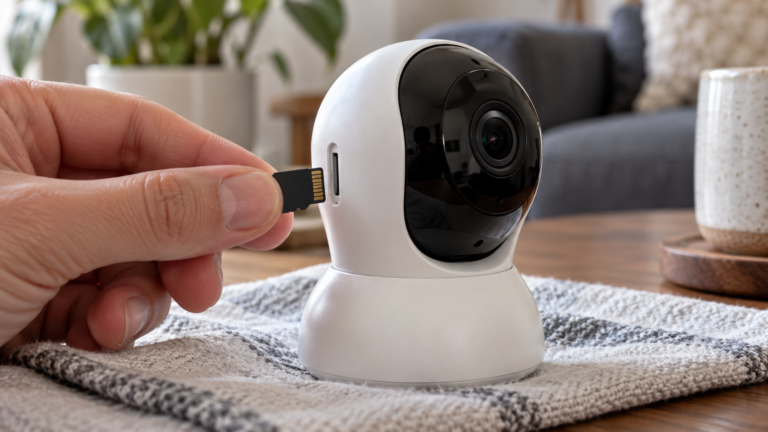
- Local recording to a memory card or a recorder is what removes the monthly plan. Cloud storage is the optional extra.
- A card inside the camera can be stolen with the camera. A recorder kept out of sight avoids that.
- Cameras with a cellular (4G) connection still need a data plan, even with no cloud plan.
What does a security camera with no subscription really mean?
The phrase covers three different things. Only the middle one saves video without a monthly payment.
| Level | What you get | The catch |
|---|---|---|
| Live view and alerts only | Watch live and get motion alerts on your phone | Nothing is kept after the moment, or only a few hours |
| Local recording | Video saved to a microSD card, a hub or a recorder you own | You buy the storage, and the footage lives where the hardware is |
| Cloud as an optional extra | Off-site copies and longer history | A monthly or yearly fee, and plans can differ by country |
Cameras with a cellular (4G) connection add one more cost. Reolink says its 4G models need a data plan when used with a Reolink SIM, which is a monthly fee even when no cloud plan is bought. See solar and 4G cameras.
Which camera brands record without a monthly plan?
| Brand | Without a plan | Where video is kept | Optional paid extra |
|---|---|---|---|
| Reolink | Says its cameras need no subscription. Reolink page dated Aug 11, 2026 | microSD card or an NVR (recorder) | Reolink Cloud, 4G data plans |
| eufy | Says eufyCam does not require a monthly subscription. eufy Canada page | A HomeBase hub with expandable local storage | Cloud storage, optional |
| Tapo (TP-Link) | Says core features are free with local storage. Tapo page dated 06-12-2026 | microSD card, up to 512 GB, sold separately. TP-Link FAQ, Aug 3, 2026 | Tapo Care cloud, never required |
| Lorex | Lists a WiFi model with no subscription required. Lorex product page (US site) | microSD card (that model: up to 256 GB) or the NVR in a wired kit | Lorex cloud on compatible cameras |
| Blink | Live view and motion alerts work without a plan. See Blink subscription in Canada | A Sync Module 2 with a USB drive of 1 to 256 GB on eligible cameras. Blink support | Blink Subscription Plan |
| Ring | Live view, motion alerts and two-way talk. Recorded video history is part of a Ring Protect plan. Ring page dated Jul 16, 2026 | Cloud | Ring Protect |
| Nest (Google) | Live view, plus a few hours of event history: up to 3 hours on most models and up to 6 hours of event previews on some. Google Home Help | Cloud | Google Home Premium (Nest Aware) |
The table sorts by how video is stored and does not rank brands. Plans change, so confirm on the maker’s page for your model. Arlo and Wyze are not included because their plan pages were not checked for this guide. More: brands compared and doorbell cameras without a subscription.
Want local-recording cameras installed?
Send photos of the spots. WiFi cameras from $200 for one or two, wired CCTV by free written quote. You pay after the job.
How many days of video does a card or a recorder hold?
Storage fills at the camera’s bitrate. These planning estimates assume continuous recording at 2, 4 and 8 Mbps. Your camera’s real bitrate depends on resolution and scene, so check its datasheet. Motion-only recording stretches the figures.
| Bitrate | 128 GB card | 256 GB card | 512 GB card |
|---|---|---|---|
| 2 Mbps (21.6 GB per day) | 5.9 days | 11.9 days | 23.7 days |
| 4 Mbps (43.2 GB per day) | 3.0 days | 5.9 days | 11.9 days |
| 8 Mbps (86.4 GB per day) | 1.5 days | 3.0 days | 5.9 days |
| Recorder drive | Days of continuous video |
|---|---|
| 1 TB drive | 5.8 days |
| 2 TB drive | 11.6 days |
| 4 TB drive | 23.1 days |
Four cameras at 4 Mbps write about 173 GB a day. That is why a recorder suits a whole property and a card suits one or two cameras. See NVR vs DVR for the recorder types.
Which no-subscription setup fits your home?
| Your situation | Usually the better fit | Watch for |
|---|---|---|
| Condo or rental, no drilling | A plug-in WiFi camera recording to a card | Building rules: apartment and condo cameras |
| One entrance or driveway, good WiFi | One or two WiFi cameras with cards | Cold weather and signal at the spot. See PoE vs WiFi in winter |
| Whole house, four or more cameras | Wired PoE cameras with a recorder | A written quote with the storage days listed |
| Cottage or cabin with no internet | Solar or 4G cameras | A data plan for 4G. See cottage and cabin cameras |
| You want someone to respond to alarms | Cameras plus a separate monitoring service | Pixl does not monitor. See alarm company or camera installer |
Two trade-offs: a card in the camera sits where a thief can reach it, and local storage gives no off-site copy. Menu names change with firmware, so check the maker’s page. Where a camera points is a privacy question too: see security camera laws in Canada.
Can Pixl supply and install cameras that need no subscription?
Yes. Pixl can supply the cameras, or install ones you already own. Say you want no monthly fee and the quote is written around local recording. Pixl does not monitor cameras.
| Job | Pixl price | Sum |
|---|---|---|
| One or two WiFi cameras, booked alone | From $200 | $200 |
| Home WiFi setup plus two cameras | $129 + 2 x $89 | $307 |
| Battery doorbell plus one camera | $99 + $89 | $188 |
| Four or more cameras, or any recorder system | Free written quote | No number until quoted |
Walls and extra parts can move these sums. See WiFi camera installation, setup for cameras you own and the price list.
How does booking work?
- Send photos. Each spot, the router, and where a recorder could sit.
- Say what you own. Send camera models, or ask Pixl to supply them.
- Get a price in writing. WiFi jobs get a fixed price. Wired CCTV gets a free written quote.
- Choose a day. Same-day service is available when we have an opening.
- Pay at the end. Card, e-transfer or cash once it works.
Book cameras that record to your own storage
Photos are enough to start. You pay after the job.
You want cameras that record without a monthly plan and want them mounted, aimed and tested on your WiFi.
You want a company to watch the cameras and respond to alarms. Pixl installs and sets up, and does not monitor.
Security cameras without a subscription: frequently asked questions
Which security camera has no monthly fee?
Cameras that record to a microSD card or a recorder you own. Reolink, eufy, Tapo and Lorex state on their own pages that local recording needs no plan. Check the exact model before you buy.
Do security cameras work without a subscription?
Yes. Live view and motion alerts work without a plan on the brands above. What changes is saved video: some brands keep it on your card or recorder, others in the cloud behind a plan.
Does Ring work without a subscription?
Ring says live view, motion alerts and two-way talk work without a Ring Protect plan. Cloud video history is part of the plan, per Ring’s page dated July 16, 2026.
Do Blink cameras need a subscription?
Not for live view and motion alerts. Saved clips need a plan unless you use a Sync Module 2 with a USB drive on an eligible camera.
Is there a security camera with no subscription and no WiFi?
Cameras that record to a card or recorder can keep recording when the internet is down, but remote viewing and alerts need a connection. For a site with no internet, look at solar or 4G models and check the data plan.
How long does a microSD card record?
It depends on the bitrate. A 256 GB card holds about 5.9 days at 4 Mbps of continuous recording (calculated). Motion-only recording lasts longer.
Can someone steal the footage?
If the card is inside the camera, yes, because a thief can take the camera. A recorder out of sight, or an off-site copy, avoids that.
Can Pixl install cameras I already bought?
Yes. Send the model and a photo of each spot. WiFi cameras start at $200 for one or two.
Get cameras that record without a monthly plan
Start with photos of the spots and get the plan in writing.
WiFi camera installation
Installation price list
How to choose a security camera
Doorbell cameras without a subscription
All installation services
Installation by project
Installation guides library
Home security systems: cameras, alarm or both
Home security upgrade checklist
Sources and method. Maker pages linked in the table were read October 31, 2026. The Lorex page is the US site; Canadian pricing is on lorex.ca. Plans and features change, so confirm on each maker’s page. Storage days were calculated with Python: GB per day = bitrate in Mbps / 8 x 86,400 / 1,000, then days = capacity / GB per day (decimal units, before formatting overhead). Four cameras at 4 Mbps = 4 x 43.2 = 172.8 GB per day. Pixl prices are posted prices checked October 31, 2026, in Canadian dollars before tax: $129 + 2 x $89 = $307; $99 + $89 = $188. Pixl does not monitor cameras.
About Pixl Canada. Pixl Canada is an installation company based in Edmonton, Alberta, serving cities across Canada with TV mounting, security cameras, appliance installation and smart home setup. Call or text (587) 899-7495. Open Monday to Saturday 8am to 8pm and Sunday 9am to 7pm.